
| 일 | 월 | 화 | 수 | 목 | 금 | 토 |
|---|---|---|---|---|---|---|
| 1 | 2 | 3 | 4 | 5 | 6 | 7 |
| 8 | 9 | 10 | 11 | 12 | 13 | 14 |
| 15 | 16 | 17 | 18 | 19 | 20 | 21 |
| 22 | 23 | 24 | 25 | 26 | 27 | 28 |
- 이메일 영어
- plot vector
- abaqus
- Steady state heat transfer
- Vibration
- plot3
- Rigid body
- 영어표현
- FEBio tutorial
- 이메일영어
- 아바쿠스
- Heat transfer analysis
- Multi-step loading
- FEA
- C
- 컨택해석
- FEBiO
- transform
- MATLAB
- send email
- 접촉해석
- finite element analysis
- Tensile test
- Biphasic
- vector angle
- contact
- Today
- Total
Enjoy Learning & Knowing
Matlab: Fit linear regression model 본문
Summary of ‘Fit linear regression model’ in Matlab: the details are in the following webpage. https://www.mathworks.com/help/stats/fitlm.html#bt0ck7o-modelspec
Fit linear regression model
mdl = fitlm(tbl) % using variables in the table or dataset tbl. The last variable: the response variable.
Tip: storing the variables in a table
Ex) tbl = table(variable1 names, variable2 names, …., ‘VariableNames’, {‘actual variable1 name’, …});
xxx = fitlm(tbl, ‘response name~variable1 name+variable2 name …’)
mdl = fitlm(x,y) % x: data matrix, y: responses.
mdl = fitlm(___, modelspec) % define model specification
mdl = fitlm(___, modelspec) % specifies additional options
model specs
'constant': contains only a constant (intercept) term.
'linear': contains an intercept and linear term for each predictor.
'interactions': contains an intercept, linear term for each predictor, and all products of pairs of distinct predictors (no squared terms).
'purequadratic': contains an intercept term and linear and squared terms for each predictor.
'quadratic': contains an intercept term, linear and squared terms for each predictor, and all products of pairs of distinct predictors.
'polyijk': a polynomial with all terms up to degree i in the first predictor, degree j in the second predictor, and so on. Specify the maximum degree for each predictor by using numerals 0 though 9. The model contains interaction terms, but the degree of each interaction term does not exceed the maximum value of the specified degrees. For example, 'poly13' has an intercept and x1, x2, x22, x23, x1*x2, and x1*x22 terms, where x1 and x2 are the first and second predictors, respectively.
The properties of model
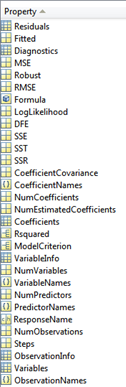
mdl.Coefficients : shows the estimated coefficient
-. Estimate: estimated coefficient for each term
-. SE: standard error of coefficient
-. tStat: t-statistics for each coefficient testing the null hypothesis (coeff=zero), tStat = Estimate/SE
-. pValue: p-value for the t-statistics of the hypothesis, >0.05 means this term is not significant at the 5% significance level
mdl.Coefficients.Estimate is showing the estimated coefficient for all terms.
The model formula in the display, y ~ 1 + x1 + x2 + x3, corresponds to y=β0+β1X1+β2X2+β3X3+ϵ.
Model summary
· Number of observations: Number of rows without any NaN values.
· Error degrees of freedom: n: the number of observations, p: the number of coefficients in the model (including the intercept)
· Root mean squared error: square root of the mean squared error: the standard deviation of the error distribution.
· R-squared and Adjusted R-squared: Coefficient of determination and adjusted coefficient of determination, respectively; the R-squared value suggests that the model explains approximately xx% of the variability in the response variable.
· F-statistic vs. constant model: Test statistic for the F-test on the regression model, testing whether the model fits significantly better than a degenerate model consisting of only a constant term.
· p-value — p-value for the F-test on the model; the model is significant with a p-value of xxxx.
'Matlab' 카테고리의 다른 글
| Sending an email in Matlab (0) | 2019.12.06 |
|---|
